
Keep every opportunity moving.
The Bid Board connects opportunity tracking with qualification, plans, takeoff, estimating, proposals, organizations, contacts, and project context instead of acting like a generic CRM.
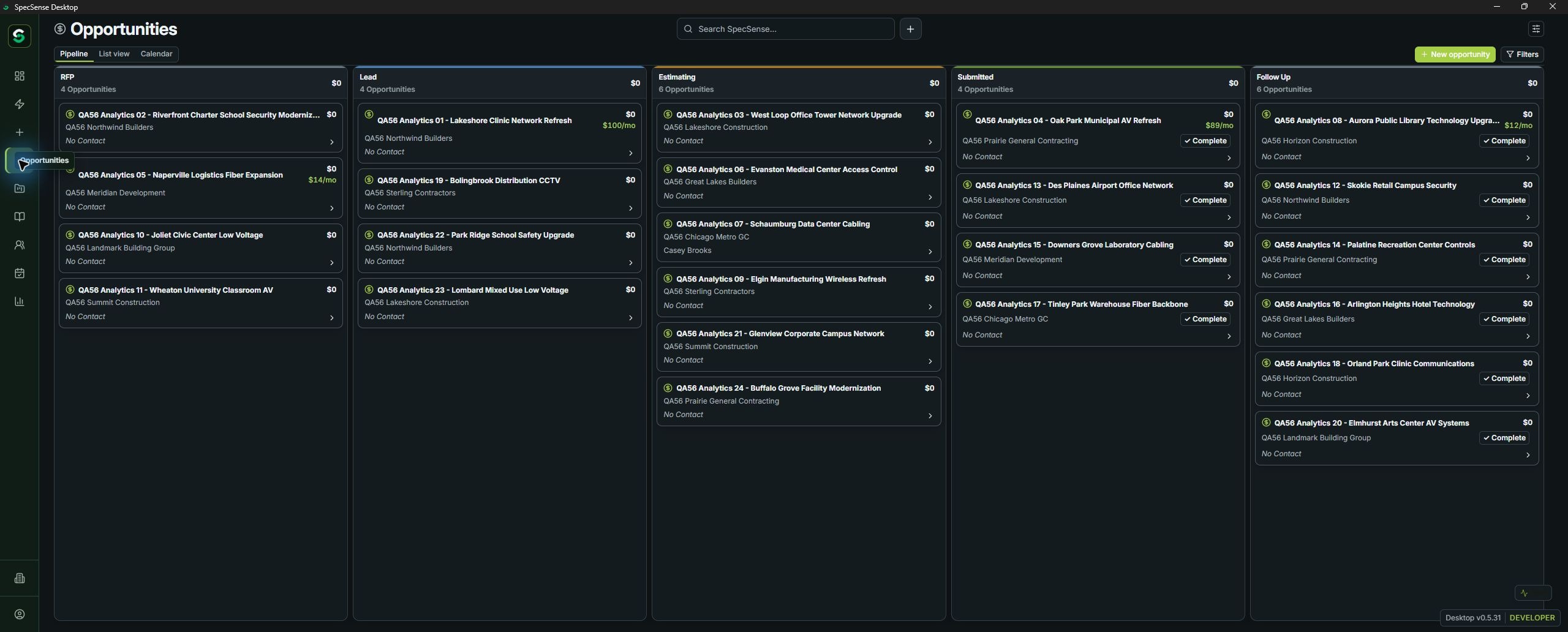
- 01RFP intake
- 02Review details
- 03Track the deadline
- 04Estimate & propose
- 05Submitted
- 06Awarded / lost
Turn an RFP email into a bid opportunity.
Drag an RFP email into the Bid Board and SpecSense opens a review-first intake flow. It can suggest the project name, bid due date, and attachments so the opportunity starts with the documents and deadline that arrived with it.
Nothing is created until the user confirms the review. That keeps the process fast without treating extraction as flawless or replacing estimator judgment.
See the RFP intake steps
- RFP emailBring in the source message and supporting files.
- Review detailsConfirm suggested project information and due date.
- AttachmentsKeep plans, specifications, addenda, and bid documents with the opportunity.
- Bid BoardStart the opportunity in the same workflow that manages the bid.
Follow the opportunity
Capture the opportunity
Drag an RFP email into SpecSense, review the suggested opportunity details, and confirm the record without rebuilding it by hand. The intake review can suggest a project name, bid due date, attachments, and other available project context; uncertain or missing fields remain editable.
Keep people and follow-ups in context
Link an organization and primary contact to an opportunity. Add dated, assigned tasks or reminder tasks, and use scheduled Activities for calls, email follow-ups, meetings, or other next actions connected to an opportunity, contact, organization, or project. These are records and in-app views—not automatic email, SMS, or calendar notifications.
Keep the work connected through outcome
Move qualified opportunities into estimating and proposal workflows, track Submitted status, and record Awarded or Lost outcomes where supported. Reuse Price Book entries in BOM estimating, carry labor and pricing into proposal work, then return to the Bid Board to manage the opportunity.
Next: Insights
Track the opportunity, then use the resulting project activity to understand your pipeline and workload.
View Insights